
Photographing female characters in the otaku universe has transcended simple image capture. Today, cosplayer photography seeking the 'kawaii' and 'waifu' aesthetic demands technical mastery that blends cinematic lighting with highly specific post-production treatment. The goal is to create an image that looks like it jumped straight off an anime screen, using techniques that soften textures, enhance vibrant colors, and create that characteristic ethereal glow.
In this guide, we will explore how to balance equipment, environment, and software to achieve this dream look, ensuring that every detail of your cosplay is valued.
Visual read of the character
The visual reading of a 'waifu' or 'kawaii' style character is based on three fundamental pillars: silhouette, color scheme, and texture. Before pressing the shutter, you must identify what makes that character unique. Kawaii characters generally have silhouettes that evoke softness: curved lines, rounded accessories (bows, ears, ruffles) and a color palette that tends towards pastel tones or highly saturated primary colors.
The anime aesthetic is defined by the intentional exaggeration of certain elements. If your character uses large accessories, such as a disproportionate hair bow or platform boots, these items should be the focus of your composition. The correct "reading" of the character involves understanding whether the pose should be energetic (active) or contained (shy/waifu). Poses that close the silhouette, such as hands near the face or bent knees, help convey the delicacy necessary for the kawaii aesthetic.
Priority pieces to get right first
For cosplay photography to reach a professional level, prioritize the following elements in the order below:
- Skin and makeup: In anime aesthetic photos, skin should look flawless. Use high-coverage foundations and finish with translucent powder to avoid unwanted oily shine. Blush should be applied more noticeably than usual, moving up the cheeks towards the eyes.
- The wig: It is the frame of your face. Make sure the cut is aligned and there is no gap between the wig cap and the fiber. A poorly styled wig breaks the immersion of any waifu aesthetic.
- Facial lighting: The face is the point of convergence. Light should be soft and diffuse to eliminate hard shadows that reveal skin textures or makeup imperfections.
- Pose and expression: The "anime gaze" is a technical challenge. Practice expressions that involve a slight smile or a focused gaze, keeping the chin slightly tilted down to create a more youthful proportion.
Practical build adaptation
Translating 2D design into 3D requires smart adaptations. Often, what works in the drawing does not work on the real body due to gravity and human proportions. If your character wears an extremely voluminous skirt that seems to defy physics, consider using a tulle or crinoline frame underneath to maintain the shape without needing heavy editing later.
For accessories, prefer light materials such as high-density EVA (thickness of 2mm to 5mm). EVA allows you to create large accessories, like shoulder pads or giant bows, without them weighing down your outfit during hours of photoshoot. Remember: comfort is part of the aesthetic. If you are uncomfortable, your posture will change and cosplayer photography will capture that tension, ruining the naturalness of the kawaii look.
Estimated Budget
| Item | Price range | Source |
| --- | --- | --- |
| Anel de Luz com Tripé (grande) | $16.00 - $50.00 | Estimated FX |
| Lâmpada Sunset (Projetor de Pôr do Sol) | $8.00 - $24.00 | Estimated FX |
| Filtros Gelatinosos de Cor (Rosa/Roxo) | $4.00 - $10.00 | Estimated FX |
Estimated conversion based on a reference FX rate; local retail prices may differ.
Common Mistakes e Soluções
- Hard shadows on the face: The most common mistake is using direct light without diffusion. This creates deep dark circles and highlights pores.
- Solution: Place a diffuser or fine white fabric between the light and the model. If using a ring light, place it at a distance of 1.5m and use a slower shutter speed to capture ambient light.
- Washed-out colors: Trying to apply generic filters to photos that were not well lit.
- Solution: Always shoot in RAW format. This allows you to adjust white balance and color vibrancy in waifu editing without losing image quality.
- Incorrect focus on eyes: In anime-style portraits, if the focus isn't locked on the eyes, the image loses emotional impact.
- Solution: Use continuous autofocus mode with eye detection (present in most modern smartphones and mirrorless cameras).
Passo a passo: Configuração de Luz e Edição
This section details how to achieve the desired aesthetic through practical techniques.
- Kawaii lighting positioning: Place your main light source (softbox or ring light) at 45 degrees from your face, slightly above eye level. This creates a soft shadow on the opposite side of the face, defining the contour without creating a "skull" look.
- Checkpoint: The light should evenly illuminate both eyes. If one eye is in shadow, move the light to the center or to the opposite side.
- Applying sunset light: For the sunset light effect, position the projector behind you at a 45-degree angle, pointing at the wall or background. This will create a halo of golden or orange light that separates the character from the background, essential for the anime aesthetic.
- Checkpoint: The halo should outline your hair and shoulders, creating a glow (rim light) that highlights your silhouette.
- Capture with phone or camera: If you are using phone photography, make sure to clean the lens before shooting. Use "Portrait" mode to simulate depth of field, but keep the blur effect (bokeh) at a medium level (between f/2.8 and f/4.0) so it doesn't look too artificial.
- Checkpoint: Check that the photo is not blown out in the highlights (very strong whites) or too dark in the details.
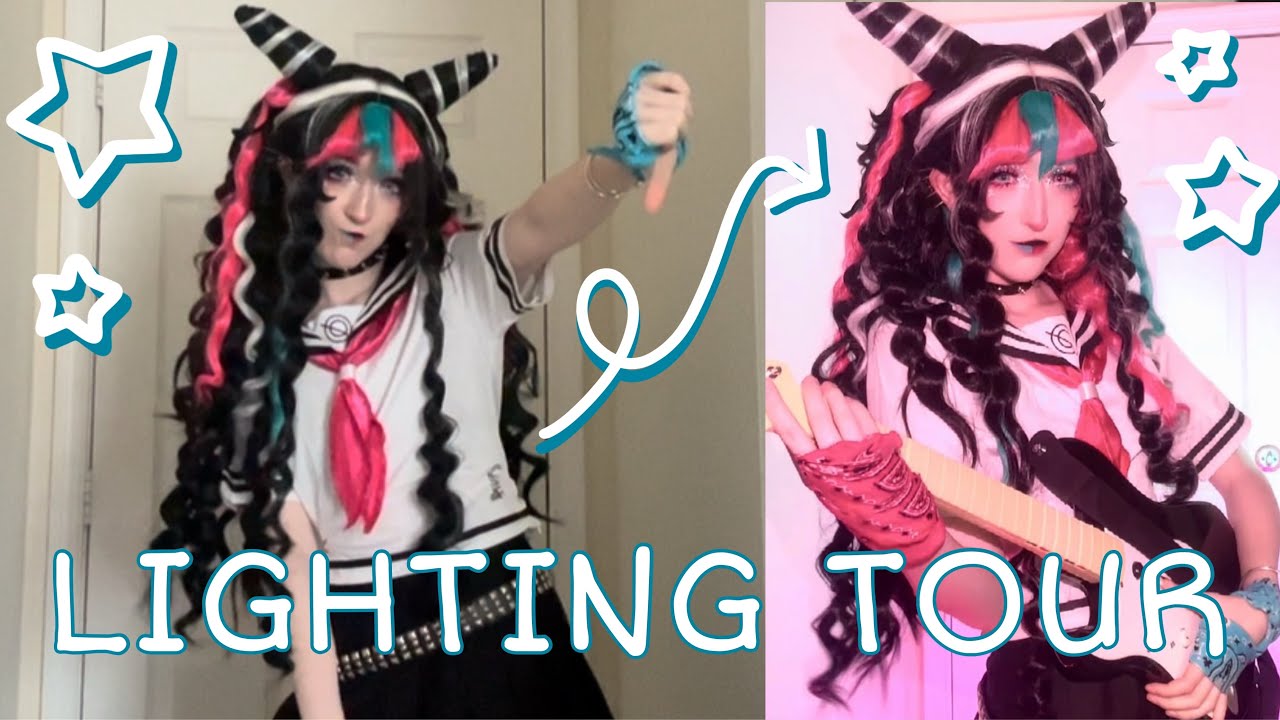
- Waifu editing in Lightroom: Import your photo and start by adjusting white balance to warmer tones. Increase exposure slightly (+0.3 to +0.5) and reduce texture and clarity (between -10 and -20) to soften skin.
- Checkpoint: Skin should look soft, but eyes and cosplay details (such as embroidery and rhinestones) should remain sharp.
- Pastel tone adjustment: In Lightroom's HSL panel, adjust pink, blue, and yellow hues. Reduce the saturation of orange tones (skin) and increase luminance. This creates the "porcelain" look typical of the anime aesthetic.
- Checkpoint: Compare the original photo with the edited one. The edited version should look more "dreamy" and bright, without losing the natural color of your clothes.
Materiais e Estratégia de Execução
To ensure your shoot is a success, you will need specific materials. The choice of background is crucial: clean backgrounds (white walls, colored paper backgrounds, or outdoor areas with blurred vegetation) work best to highlight the character.
- Mandatory materials: Camera (or smartphone with good aperture), stable tripod, continuous light source, diffuser (white fabric or parchment paper).
- Recommended materials: Gelatin filters (pink or purple) to place in front of the light and create a dreamy atmosphere, light reflectors to fill shadows.
When planning your session, think of cosplay photography as a design project. If you are creating a 'Kangel' or 'Ame-chan' look (from Needy Streamer Overload), the lighting should be more neon and contrasted. If your goal is a classic and soft waifu, focus on pastel tones and diffused natural light.

Aprofundamento na Edição: Lightroom e Retouching
Retouching for this style is not just about removing pimples. It is about "cleaning" the image. In Lightroom, use the adjustment brush to brighten the whites of the eyes and slightly increase the saturation of the iris. If your cosplay has metallic elements, increase contrast only in those areas to give a more "premium" look to the accessory.
Don't be afraid to use lightroom presets as a starting point, but always adjust manually. Each photo has different lighting, and a preset that works on a cloudy day won't work in a studio with artificial light. The secret of waifu editing is consistency: try to maintain the same skin tone across all photos in your shoot to create a harmonious feed on social networks.
Conclusão e Próximos Passos
Cosplayer photography is a journey of constant learning. Start by mastering natural light, understand how shadow shapes your face, and eventually invest in lighting equipment that allows you to control every detail of the scene. Remember that technology is a tool, but your artistic vision is what truly defines the kawaii aesthetic you wish to convey.
To continue improving your work, we recommend reading our guide on how to value textures and props, where we explain how to focus on the manual details of your outfit, and the light and LED effects tutorial, which elevates the technical level of any armor piece or futuristic accessory. Constant practice, combined with critical analysis of your own material, will make your anime girl photos stand out on any platform.